.png)
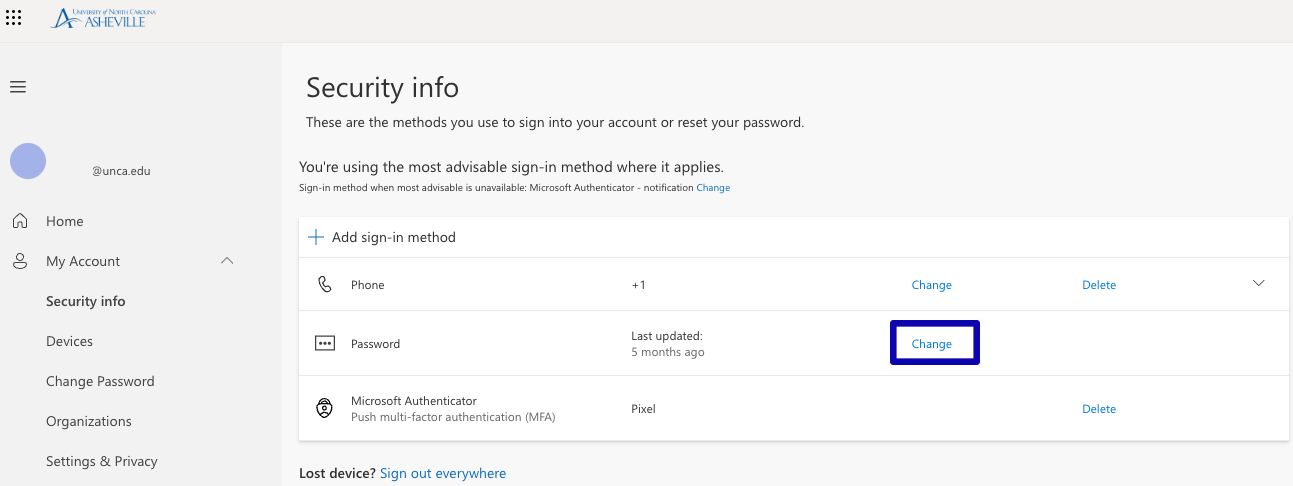
If you currently have access to your account, but need to reset your password please visit https://mysignins.microsoft.com/security-info and click Change beside Password.
If you are a first time user and need to set an initial password please visit https://kb.unca.edu/kb/first-time-account-claim
If do not know your password or your Entra SSO account is locked please visit https://kb.unca.edu/kb/forgot-password
UNC Asheville Password Requirements
-
Passwords cannot contain the user's account name or parts of the user's full name that exceed two consecutive characters.
-
Passwords must be at least 12 characters and no more than 64 characters in length.
-
Passwords must not be the same as any of the 7 most recently used passwords.
-
Passwords must contain characters from three of the following four categories:
-
English uppercase characters (A - Z).
-
English lowercase characters (a - z).
-
Numeric digits (0 - 9).
-
Non-alphabetic characters:
{ } [ ] . ? / ! ^ * _ - + =
-
-
Common passwords, passwords that were involved in a known breach, and easily guessable passwords will also be rejected.